
4.9 Examples of AI Prompts for Creating Pinboards
Edumaps Tutorial EdumapsIntroduction
-
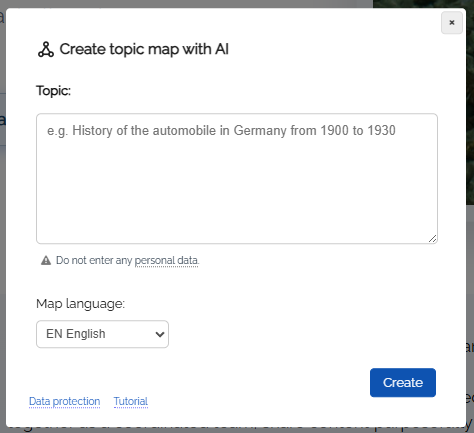
✔️ With the AI module you can create any pinboards you like. Content is generated according to your instructions.
-
-
Instructions:
-
1. Click on "Create map" in the sidebar.
2. Select "Topic Map".
3. In the dialog that opens, enter your instruction. -
Creating the map takes about 60 seconds.
1
📚 Lesson Plan Generator
-
Create a detailed and structured lesson plan suitable for [subject], targeting [grade level]. Include learning objectives, key concepts, suggested activities, assessment methods, and required materials. Format the plan into sections with clear headings and lists for each component. Ensure the content is engaging and accessible for both teachers and students.
-
Text als Auftrag an KI senden
2
🌍 Interactive Geography Factboard
-
Generate a pinboard that showcases fascinating facts, and quick quizzes about [continent/country/topic]. Each box should feature a subtopic such as culture, geography, language, or famous landmarks. Use bullet points and brief explanations to make facts easy to digest. Include a fun activity suggestion in each box to help learners engage further with the content.
-
Text als Auftrag an KI senden
3
🧪 Science Experiment Collection
-
Compile a set of safe, at-home science experiments suitable for students in [grade level]. For each experiment, provide a title, a list of materials, step-by-step instructions, expected results, and a brief explanation of the underlying scientific principle. Use clear, concise language and emphasize safety precautions where necessary.
-
Text als Auftrag an KI senden
4
🖋️ Writing Prompt Ideas
-
Suggest creative writing prompts for [genre or topic] to inspire student work. For each prompt, give a scenario or question, possible themes, and a brief outline of what students might include in their response. Arrange the prompts in a pinboard format, making it easy to select one for a classroom activity or homework assignment.
-
Text als Auftrag an KI senden
5
💡 Study Tips & Techniques
-
List effective study strategies for students preparing for [subject or standardized exam]. Include techniques like active recall, spaced repetition, mind mapping, and group study. Explain the benefits and proper use of each strategy. Provide practical advice for creating a study schedule and minimizing distractions. Use checklists and tips for best results.
-
Text als Auftrag an KI senden
6
🧩 Math Challenge Board
-
Create a pinboard featuring a variety of math challenges tailored to [grade level or topic, e.g., fractions, algebra]. Each box should contain a problem statement, hints for solving it, and a detailed explanation of the solution. Incorporate both word and number problems for diverse practice. Highlight key mathematical concepts involved in each challenge.
-
Text als Auftrag an KI senden
7
🎨 Visual Arts Inspiration
-
Design pinboard content that introduces students to different art styles, artists, and creative activities. Each box should provide an overview of an art movement, a brief biography of a famous artist, or a step-by-step art project. Incorporate images, color palettes, and quick exercises to stimulate creativity in students. Use engaging language and clear formatting.
-
Text als Auftrag an KI senden
8
📖 Reading Recommendations
-
Curate a list of engaging books tailored to [age group or reading level]. For each recommendation, provide the book title, author, a brief summary, and reasons why it’s a great choice for students. Mention themes and any related discussion questions that could be used in class. Arrange the selections to promote variety in genre and perspective.
-
Text als Auftrag an KI senden