Logo

edumaps

  • Media Libraries
    • Free Media Library
    • Map Gallery
    • Public Profiles
  • Pricing
    • Teacher and Private
    • Schools
  • Help
    • FAQ
    • Tutorials
    • Templates / Examples
    • Helpful Tools
    • Contact
FAQ Free Media Library
en
DE
EN
ES
FR
IT
Login Register
  • Pricing
    • Teacher and Private
    • Schools
  • Help
    • FAQ
    • Tutorials
    • Templates / Examples
    • Helpful Tools
    • Contact
4
Add Map via Map List
  • To add a map, select “My Maps” or “Visited Maps”, and you will be redirected to the corresponding page.
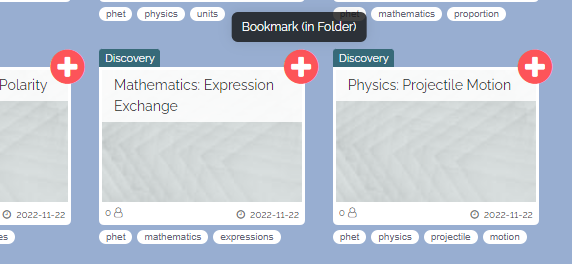
  • There you can select the desired map by clicking on a red cross.
  • Preview image Select Map in Map List
    Select Map in Map List
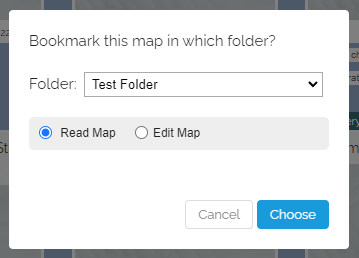
  • A dialog will then appear for selecting your folder and with which permissions the map should be stored there.
  • Preview image Folder Selection for Saving the Map
    Folder Selection for Saving the Map
  • ⚙ maplist
0

Terms Privacy FAQ Legal Contact

Made with by Edumaps

Made with ❤ by Edumaps