Logo

edumaps

  • Galerie
  • Tutorials
  • Preise
    • Lehrer und Privat
    • Schulen
  • Hilfe
    • FAQ - Häufige Fragen
    • Vorlagen und Beispiele
    • Hilfreiche Tools
    • Kontakt
FAQ Freie Mediathek
de
DE
EN
ES
FR
IT
RU
Anmelden
  • Galerie
  • Tutorials
  • Preise
    • Lehrer und Privat
    • Schulen
  • Hilfe
    • FAQ - Häufige Fragen
    • Tutorials
    • Vorlagen und Beispiele
    • Hilfreiche Tools
    • Kontakt
3
Options for adding a Map in a Folder
  • If you are in a folder, you can click the “Add Map” button.
  • Vorschaubild Buttons in the Folder
    Buttons in the Folder
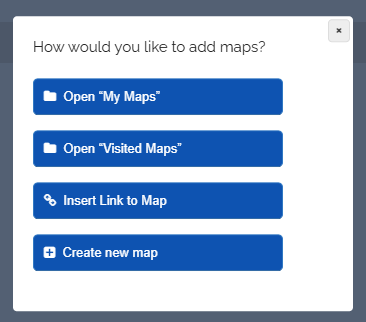
  • Then the following selection will appear:
  • Vorschaubild Selection for Adding Maps
    Selection for Adding Maps
    1. My Maps
    2. Visited Maps
    3. Select “Insert Link to Map”, then you can insert a map link in the input field that opens.
    4. Create a new map directly inside the folder.
  • ⚙ options
0

AGB Datenschutz FAQ Impressum Preise Kontakt

Made with by Edumaps

Made with ❤ by Edumaps