Logo

edumaps

  • Gallery
  • Tutorials
  • Help
    • FAQ
    • Templates / Examples
    • Helpful Tools
    • Contact
  • Pricing
    • Teacher and Private
    • Schools
FAQ Free Media Library
en
DE
EN
ES
FR
IT
Login Register
  • Gallery
  • Tutorials
  • Pricing
    • Teacher and Private
    • Schools
  • Help
    • FAQ
    • Tutorials
    • Templates / Examples
    • Helpful Tools
    • Contact
4
Integrate the Edumaps calendar into the app
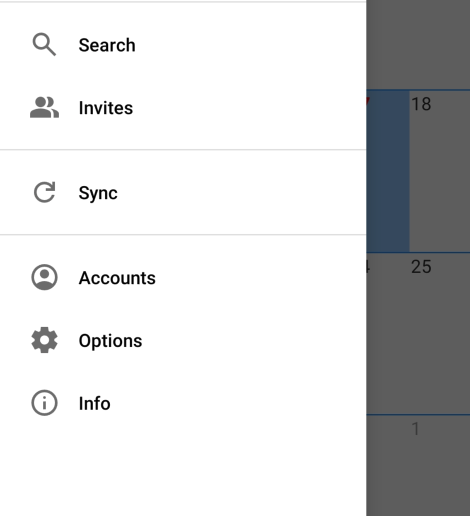
  • Open the app and click the icon for the menu.
  • There, select "Accounts":
  • Preview image Selection: Accounts
    Selection: Accounts
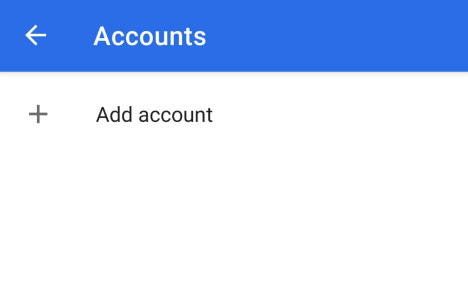
  • Now click on "Add account":
  • Preview image Add Account
    Add Account
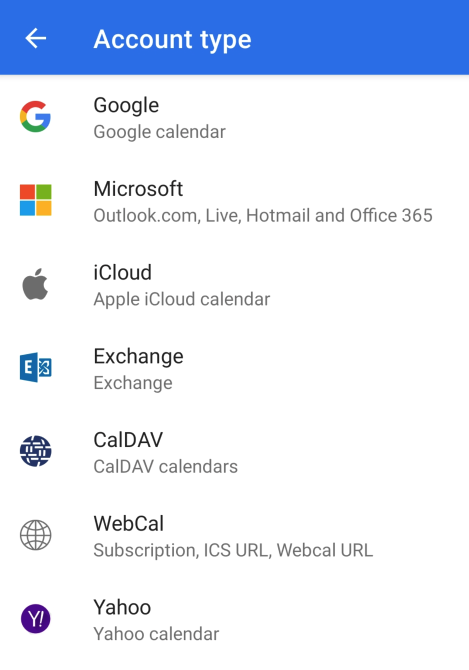
  • Select "WebCal" from the list:
  • Preview image WebCal
    WebCal
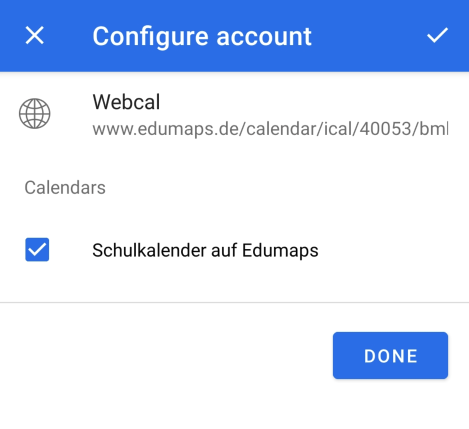
  • Insert the link into the input field and save.
  • The app should now display the confirmation:
  • Preview image iCalendar from Edumaps embedded in app
    iCalendar from Edumaps embedded in app
  • ⚙ integrate
0

Terms Privacy FAQ Legal Contact

Made with by Edumaps

Made with ❤ by Edumaps