
8 / 10
6
Step-by-Step: Assign a Task
-
1. Open the pinboard where you want to create a task. Switch to edit mode.
-
2. Select the box you wish to assign a task to. Click the three dots and choose “Edit”.
-
3. In the box settings, select the menu item “Assign Task”.
-
-
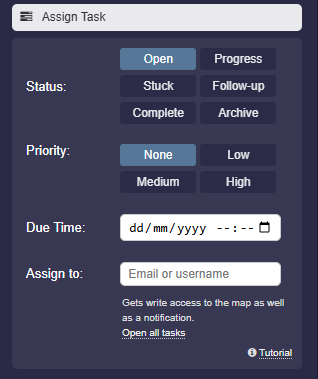
4. Fill out the fields as needed:
- Status (e.g., Open, In Progress)
- Priority (None, Low, Medium, High)
- Due date (if desired)
- Recipient username (optional) -
5. Save the box. – The recipient gets a notification and can start working on the task.
- 6. Afterwards, conveniently track all changes via the central Tasks page.
-
With just a few clicks, tasks are clearly assigned, prioritized, and traceable.
-
⚙ activate