6
Share Maps with All Schools
-
You can publish selected maps so that they are available to all schools in the system.
-
This is particularly suitable for:
-
- Announcements
- State-wide materials
- Central templates
- Reviewed teaching content
-
After sharing, schools can access these maps and integrate them into their work.
-
Activate sharing:
-
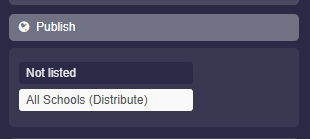
To share a map, go to the map settings and select “Publish”, then activate “All Schools (Distribution List)”.
-
-
Sharing by school type:
-
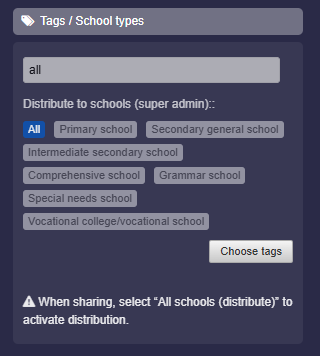
You can also specify whether the map should be distributed to all or only certain school types. To do this, click “Tags / School Types” in the map settings. Select “All” (or “Primary School”, etc.) and save the map.
- Schools will then find the map on the page “Media Center” (under Maps & Folders).
-
⚙ publish