Logo

edumaps

  • Gallery
  • Tutorials
  • Pricing
    • Teacher and Private
    • Schools
  • Help
    • FAQ
    • Templates / Examples
    • Helpful Tools
    • Contact
FAQ Free Media Library
en
DE
EN
ES
FR
IT
RU
Sign In
  • Gallery
  • Tutorials
  • Pricing
    • Teacher and Private
    • Schools
  • Help
    • FAQ
    • Tutorials
    • Templates / Examples
    • Helpful Tools
    • Contact
1
Access sharing by column groups
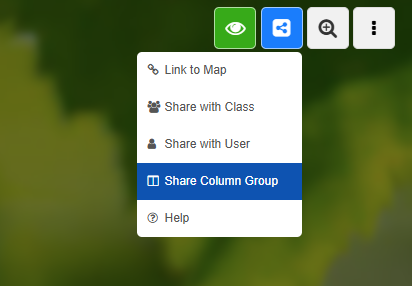
  • You will find the “Share column groups” options in the menu that opens when you click the blue share icon at the top right.
  • Preview image Menu for sharing the map
    Menu for sharing the map
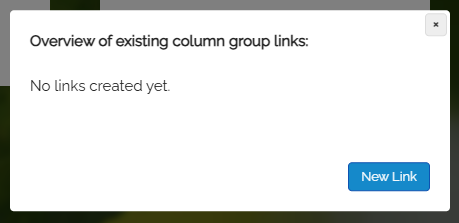
  • Click “Share column groups” from the dropdown to open the following dialog:
  • Preview image Dialog: Overview of existing column links
    Dialog: Overview of existing column links
  • Click the button “New link”.
  • ⚙ a1
0

Terms Privacy FAQ Legal Pricing Contact

Made with by Edumaps

Made with ❤ by Edumaps